How to make a ChatGPT mockup
- Pick an example conversation from the menu, or start from the default one.
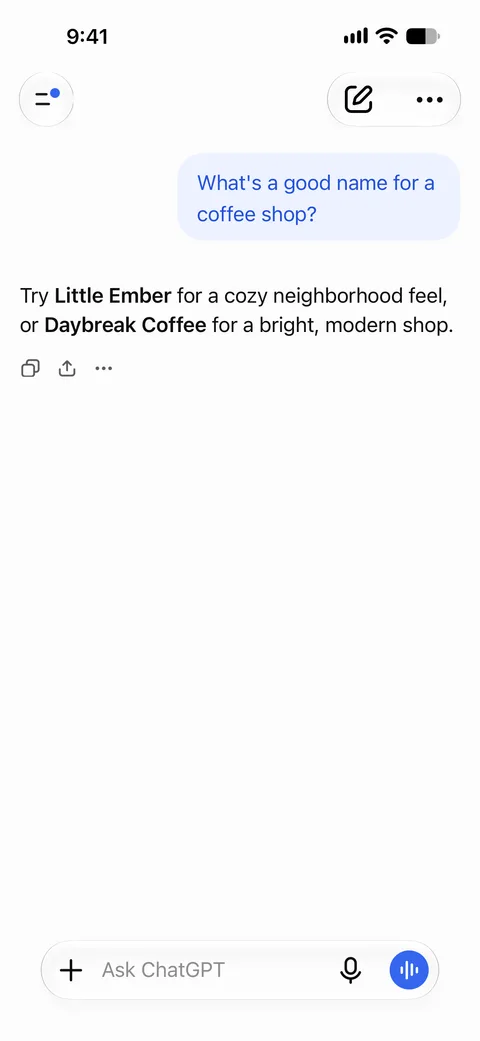
- Edit the user message and the assistant reply. Add more turns with the “User” and “Assistant” buttons.
- Format the reply with Markdown: **bold**, headings with ###, bullet and numbered lists, `inline code` and code blocks.
- Choose light or dark appearance and the accent colour, and optionally show the reply as still generating.
- Press Download PNG to save the screenshot.
What you can customize
Conversation
Any number of user and assistant turns.
Markdown replies
Bold text, headings, bullet and numbered lists, inline code and code blocks.
Light and dark mode
Switch the whole screen between light and dark.
Accent colour
Blue or purple accent.
Generating state
Show the answer as still streaming, with the stop button in the composer.
Scroll position
Scroll a long answer up behind the top bar and show the scroll-to-bottom button.
Tips for a realistic ChatGPT screenshot
Write a realistic prompt
Real prompts are often short and informal. A one- or two-line question reads more naturally than a polished paragraph.
Structure long answers
Use a heading or two, a short list and bold key phrases. Long unbroken paragraphs look unlike a typical reply.
Show code as code
Put code inside a fenced code block so it gets its own card with monospace text.
Scroll for long replies
If the reply is longer than the screen, use the scroll option to show the part that matters.
What people use it for
- Illustrating prompts in blog posts, tutorials and courses
- Product marketing, pitch decks and landing pages that show an AI chat
- UX research mock-ups and concept designs
- Humour and parody that is clearly presented as fiction
Please keep it honest: label staged screenshots as mock-ups or fiction where people could mistake them for real. See the terms of use.
Frequently asked questions
Is this a real ChatGPT conversation?
No. You write both sides yourself. The tool only draws the screenshot; it does not connect to ChatGPT or OpenAI.
Is the ChatGPT mockup generator free?
Yes, with a small SocialMock watermark on downloads. Pro ($9/month) removes the watermark.
Which formatting is supported in replies?
Markdown bold, ### headings, bullet and numbered lists, inline code and fenced code blocks.
Can I make a dark mode ChatGPT screenshot?
Yes. Set Appearance to Dark.
What size is the image?
A PNG of 1179 × 2556 pixels, the size of an iPhone screenshot, without a phone frame.
Is SocialMock affiliated with OpenAI?
No. SocialMock is an independent tool and is not affiliated with or endorsed by OpenAI. ChatGPT is a trademark of its owner.
What should I not do with it?
Don’t present an invented conversation as a real AI answer where that would mislead people, for example as evidence or in news reporting.