How to make a iMessage mockup
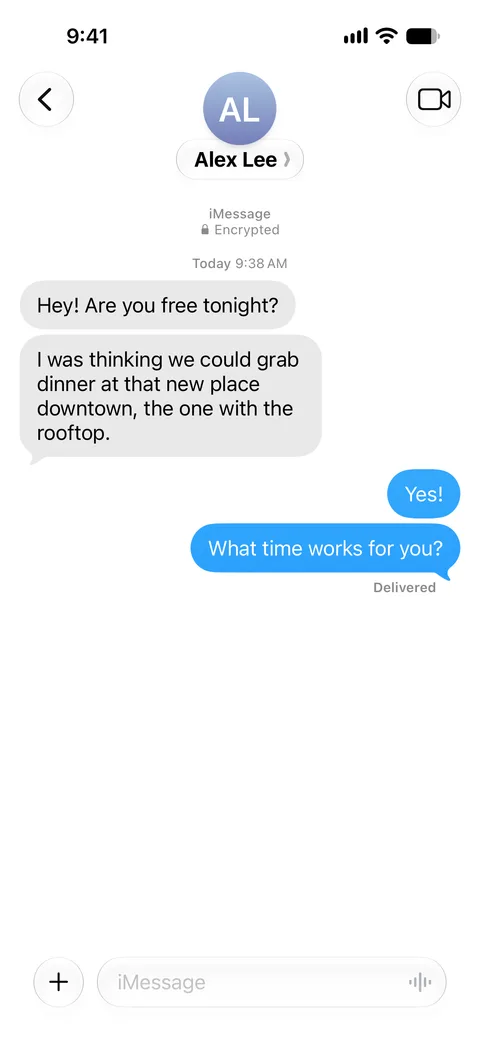
- Enter the contact name shown at the top of the chat. Upload a contact photo, or leave it empty to show initials in a grey circle.
- Add messages with the “Them” and “Me” buttons. Messages from the other person appear as grey bubbles on the left, yours as blue bubbles on the right.
- To show a time divider such as “Today 9:38 AM”, open a message’s details and fill in “Time above this message”.
- Choose what appears under your last message: nothing, Delivered, or Read with an optional read time.
- Switch Appearance between light and dark, then press Download PNG or copy the image to your clipboard.
What you can customize
Contact header
Name, photo or initials, laid out like the header of a real Messages thread.
Messages
Any number of bubbles from either side. Consecutive bubbles are grouped, and only the last bubble in a group gets the tail, as on iOS.
Time dividers
Add a centered time label above any message, for example “Yesterday 8:12 PM”.
Delivered and Read
Show Delivered, or Read with a time, under your last message, or hide the receipt.
Light and dark mode
The whole screen, including the status bar and the message input bar, follows the chosen appearance.
Status bar time
Change the clock in the status bar under the advanced options.
Tips for a realistic iMessage screenshot
Write the way people text
Real threads are short and broken into several bubbles. Two or three short messages in a row look more natural than one long paragraph.
Keep times consistent
If you add time dividers, make sure they move forward and match the status bar clock and the Read time.
Use a square photo
Contact photos are cropped to a circle. A square image with the face in the middle crops best; without one, initials are shown.
Export at full size
The PNG is 1179 × 2556 pixels, the size of a recent iPhone screenshot. Avoid scaling it up afterwards, which blurs the text.
What people use it for
- App and UX mock-ups, storyboards and product visuals
- Tutorials, slide decks and courses that need an example text thread
- Scripts, short films and social videos with a staged conversation
- Comedy and parody posts that are clearly presented as fiction
Please keep it honest: label staged screenshots as mock-ups or fiction where people could mistake them for real. See the terms of use.
Frequently asked questions
Is the iMessage mockup generator free?
Yes. You can create and download as many screenshots as you like for free; free downloads carry a small SocialMock watermark. A Pro subscription ($9/month) removes it.
Do I need to sign up or install anything?
Not to make screenshots. The editor runs in your web browser on desktop or mobile, with no account and no app to install. You only sign in with Google if you choose to remove the watermark with Pro.
Are my messages uploaded anywhere?
No. The screenshot is drawn on your device. Your text and photos stay in your browser, which also remembers your last conversation so you can come back to it.
What size is the downloaded image?
A PNG of 1179 × 2556 pixels, the native resolution of a recent iPhone screenshot, without a phone frame.
Can I make a dark mode iMessage screenshot?
Yes. Set Appearance to Dark and the whole screen switches, including the header, bubbles and status bar.
Does it support group chats, photos in messages or green SMS bubbles?
Not yet. The generator currently makes one-to-one iMessage conversations with text messages.
Is SocialMock affiliated with Apple?
No. SocialMock is an independent tool. iMessage and iPhone are trademarks of Apple Inc.
Can I use the screenshots to fool people?
Please don’t. The images are meant for mock-ups, design, teaching, entertainment and parody. Presenting an invented conversation as real, or using it to defraud or harass someone, is not allowed by our terms.